
 All Projects
Thock Mania
A free typing test with realistic mechanical keyboard sounds, a global leaderboard, and deep customisation.


Overview
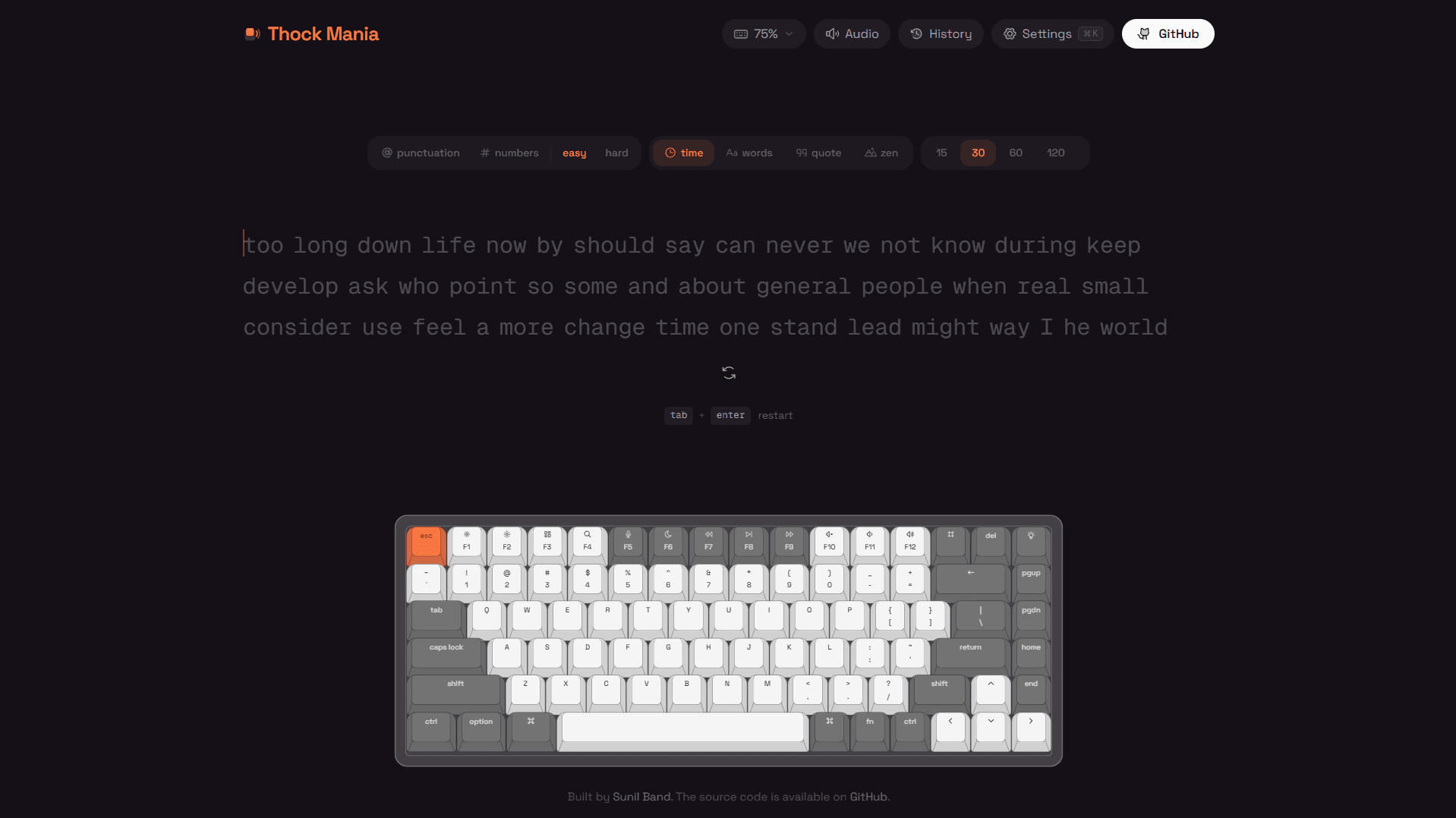
Mechanical keyboard enthusiasts obsess over the sound their boards make — the deep thock of a lubed linear, the sharp clack of a tactile switch. Thock Mania was born from that obsession. It's a typing test where audio isn't an afterthought but the core experience: every key press triggers a realistic, low-latency sound sample through the Web Audio API with per-key pitch variation and natural decay. The app tracks WPM, accuracy, and consistency in real time, then delivers a detailed results breakdown with WPM-over-time charts. Sign in with Google to save your history to the cloud and compete on a global leaderboard — or stay signed out and everything persists locally. Seven keyboard colour themes tint the entire UI, nine typing fonts let you pick the face you stare at most, and settings like caret style, haptic feedback, and ghost mode make it feel truly yours. A Serwist service worker caches everything for offline PWA use.
Sound System
The audio engine is built entirely on the Web Audio API rather than HTML5 audio elements. Each key maps to a pre-loaded AudioBuffer that plays through a dedicated AudioBufferSourceNode, which means sounds trigger with sub-10ms latency and overlap naturally even at 150+ WPM. Per-key pitch randomisation within a tight range prevents the robotic repetition you hear in simpler implementations. Multiple keyboard sound profiles are available — cherry MX-style linears, thocky topre clones, and clicky switches — each recorded from real boards and normalised for consistent volume. The audio context initialises on the first user interaction to comply with browser autoplay policies, and a gain node provides a master volume control without re-creating sources.
Test Modes & Results
Four distinct test modes cover every typing practice style: timed tests (15s, 30s, 60s, 120s) for speed benchmarking, word-count tests for focused bursts, quote mode that pulls from a curated library of real passages sorted by length presets, and zen mode for open-ended practice with no pressure. When a test completes, the results screen breaks down gross WPM, net WPM, raw speed, accuracy percentage, consistency score, character breakdown, and elapsed time. A WPM-over-time Recharts line graph shows speed fluctuation during the run. Sign in with Google and your results sync to Supabase for cloud history and leaderboard entry; stay signed out and everything still persists in localStorage with a full history panel accessible via ⌘H.
Virtual Keyboard & Mobile
An interactive on-screen keyboard renders below the typing area and highlights each key as you press it, providing visual feedback that complements the audio. A header dropdown switches between seven form factors — 100% full-size, 96%/1800, 80% TKL, 75%, 65%, 60%, and 40% — with responsive layout adaptation. On mobile, tap-to-focus captures input reliably across iOS Safari and Android (Gboard), including autocorrect and swipe typing, through careful handling of composition events and focus management. The entire app is installable as a PWA through Serwist, with offline caching of all assets including sound files.
Customisation & Leaderboard
Seven keyboard colour themes — Classic, Mint, Royal, Dolch, Sand, Scarlet, Carbon — each tint the entire UI beyond just the virtual keyboard. Nine typing fonts range from monospace staples like JetBrains Mono and Fira Code to proportional options like Inter Tight and Atkinson Hyperlegible. Caret style (line, block, underline), live WPM display, haptic feedback on supported hardware, and a ghost mode round out the settings. The global leaderboard stores one entry per user (your best WPM), powered by Supabase with client-side anti-cheat validation to prevent impossible scores from being submitted. A live visitor counter in the header shows total unique visitors to the site.
What I Learned
- 01
The Web Audio API is non-negotiable when timing and polyphonic sound overlap matter. HTML5 audio elements introduce unpredictable latency and can't layer multiple simultaneous sounds cleanly — AudioBufferSourceNodes solve both problems elegantly.
- 02
Reliable mobile text input is deceptively complex. iOS Safari's composition events, Android's virtual keyboard focus behaviour, and the inconsistency of keydown events across touch devices required extensive testing and platform-specific workarounds.
- 03
Supabase gives you auth, a Postgres database, and real-time subscriptions in one SDK — perfect for features like a leaderboard and cloud history without running your own backend. The app still works fully offline with localStorage as a fallback, so the Supabase dependency is additive, not critical.


















